My mind is insatiably curious and I have read and collected several good articles, advice, tools, templates, and lessons along the way. These have helped me at work, with projects, and at home. This is my attempt to share some of that back to others trying to learn more and with the world.
You sit down to use AI for a piece of work. The first prompt is vague, so the response is too. You refine it. Regenerate. Adjust the tone. Ask for more detail. Remove what doesn’t fit. After a few rounds, you have something you can use.
It feels efficient. But if you look closely, most of the time was spent correcting what could have been clarified before the first request was ever sent.
There is another layer to this that rarely gets mentioned. AI does not run in the abstract. Every prompt travels through servers in data centres, drawing power and requiring cooling. One request may seem insignificant. But how many requests are you making per day? The footprint of AI is real, and while a single exchange is small, scale is what turns small inefficiencies into meaningful impact.
The cost of skipping the thinking step is not just cognitive. It is operational and environmental.
Where we go wrong
If you stop using certain muscles, they weaken. Cognitive skill works the same way.
When AI starts doing thinking you should be doing yourself, the risk is not only weaker output. Over time, it affects your ability to analyse, question, and decide under pressure.
Here is where it usually goes wrong:
You let AI draft the email and do not review the tone carefully.
You accept a structured analysis without checking the assumptions behind it.
You copy a framework because it looks polished.
You mistake length for depth.
AI may invent details when it lacks context. It may reinforce the framing you give it. It may produce something that looks convincing but is slightly misaligned with your strategy, scope, or risk exposure.
And if you send that forward, the reputation attached to it is yours.
Fast does not mean flawless.
Think before you prompt
A better approach begins before you type.
AI performs best when it is clearly instructed. Missing context about audience, tone, constraints, or success criteria almost always leads to additional rounds of correction. You refine. You clarify. You ask again. What felt fast becomes repeated rework.
And there is another dimension to this that we rarely mention.
Thinking first is not just cognitively disciplined. It is operationally and environmentally responsible.
Before opening the ai tool, define:
– What must exist at the end? – Who is this for? – What tone and level of depth are required? – What constraints apply? – What would make the output unusable?
If regulatory exposure, strategic guardrails, or reputational sensitivities matter, state them explicitly.
The AI Briefing Sheet – available as a free download right below – is designed for exactly this step. It forces you to clarify intent before you outsource execution. It is editable, so you can adapt it to your specific project.
Only once the brief is clear should you move to the prompt window. If something is vague in your own mind, it will be vague in the response.
Pause before you prompt.
Staying Mentally Fit in an AI World
When AI always structures your first draft, it feels harmless at first and you slowly stop practicing structure yourself. When it consistently generates counterarguments, you stop anticipating objections. When it refines tone every time, your own calibration weakens.
Used properly, AI can be a sparring partner, a challenger, a speed amplifier, and a capable researcher. But it is not final authority. It should never be your only source, your only fact checker, or the voice that determines how your work will be perceived by specific stakeholders.
Some decisions remain entirely yours: defining what the task truly requires, editing for accuracy, checking tone, and ensuring the structure serves the intended purpose.
The final output must reflect your voice and your judgment.
Practical discipline helps. Draft your own thinking in bullets before prompting. Ask AI to challenge you. Request counterarguments. Pressure-test the output before accepting it.
When you prepare properly, AI works within your framework. Without one, you may find yourself adapting to its structure instead of the other way around.
AI will only get faster.
The real question is whether we remain deliberate.
It is a powerful assistant. Assistants extend capability. They do not set direction.
Use it well – but think first.
That is how you benefit from AI without slowly surrendering the one thing it cannot replicate: your judgment.
We’ve all been there. It’s 11:00 PM. The day was a success – mostly – but your head is still spinning. You’re dictating reminders into your phone. You’re replaying meeting snippets in your mind, trying to unpack what was actually said. To top it off, you just found the dog destroyed your favorite sweatshirt, and the evidence is all over the floor.
You’re exhausted, but you’re too wired to sleep. Your mental RAM is at 100%, and your “processor” is overheating.
Mental clutter – tasks, worries, and that nagging sense you’ve forgotten something – slows your thinking and drains your motivation. High performance and a peaceful mind both require a clean slate.
In a world where leaders are currently facing high levels of burnout and cognitive load, a structured “Worry-to-Action Pipeline” is exactly the kind of pragmatic, tested tool you have come to expect from this blog!
Here is a no-nonsense, 4-step process to move your worries from your head onto paper, and turn that noise into a concrete to-do list.
Grab a pen. Let’s get to work.
Step 1: The Raw Dump
Dump every thought, fear, and reminder spinning in your head on paper. Write them down. Don’t filter, don’t judge, and definitely don’t try to solve them yet. Just write or type until the “RAM” is empty and no more thoughts come.
If your head is spinning too fast to type, use your phone to dictate a voice note. Once it’s out of your system, move those notes to a larger screen – like your laptop or tablet – where you can actually see the “mess” you’ve collected in your mind.
The outcome: moves you from “feeling” the chaos to “seeing” the data.
Step 2: Categorize to Conquer
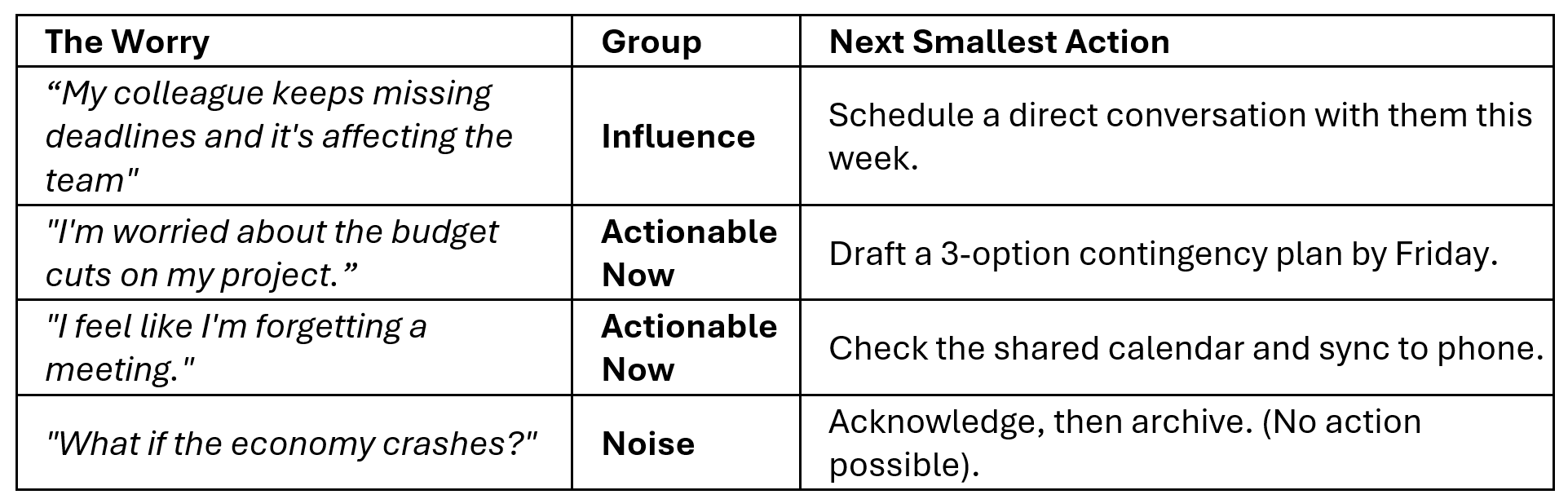
Don’t just look at the mess -sort it. Grab three highlighters (or use the highlight tool on your screen) and assign every item to one of these three buckets:
Actionable Now (Green): Things you can act on in the next 24 hours. No excuses—just tasks you can do today or tomorrow (e.g., “Email the client”).
Influence (Yellow): Things you can’t fix alone but can nudge. This requires a conversation with a colleague, a friend, or an expert. (e.g., Improving team morale when a manager is difficult to approach).
The Noise (Red): Things you cannot change. This includes the past, yesterday’s mistakes, or other people’s opinions. (e.g., The dog eating your clothes while you were out).
Examples:
Step 3: Clear the Green (The 48-Hour Rule)
The “Actionable Now” items are the easiest to solve, yet they often cause the most background noise.
The 48-Hour Rule: If it’s Green, give it a specific time slot in your calendar within the next two days. If you don’t schedule it, it stays in your head.
The “Parking Lot”: If it truly isn’t urgent and can wait longer than two weeks, move it out of your daily view. Put a reminder in your calendar for a future date and delete it from your current list.
The outcome: reduces the number of active “tabs” open in your brain. If it’s scheduled or “parked,” your brain can stop processing it.
Step 4: Delegate and Release
For the items left on your list – the Yellow and the Red – you only need one simple decision each.
For your Yellow items (things you can influence but not fix alone): identify the one person you need to involve and write their name next to the item. That’s your action. You’re not solving it tonight – you’re simply deciding who carries it forward with you. One name. Done.
For your red items – choose a small ritual of release. Red items are RAM-drainers – things you cannot change, control, or solve tonight. But simply crossing them out rarely works. Your brain needs a small, deliberate act to believe it has actually let go.
Choose a ritual that suits you:
Tear it up. Transfer all your red items onto a separate page. Then tear that page – slowly and deliberately – into small pieces. The physical act of destruction signals to your brain that processing time on these is officially closed.
Box it. Not ready to destroy them? Fold the page and place it in a dedicated box – a shoebox, a tin, anything with a lid. This isn’t surrender; it’s containment. Tell yourself: if this still matters in two weeks, it will still be in the box. Most of the time, when you check, it won’t.
Either way, once the red items are off your main list and out of your hands – torn up or lidded away – your brain has its permission to stop processing them tonight.
Close the list. You’re done for tonight.
Tonight, you don’t need to solve everything. You just need to stop carrying it all at once. A pen, a page, and twenty minutes is enough to move from spinning to settled – and to wake up tomorrow with a clearer head and a shorter list. Your brain will thank you for it.
I started writing this in September 2025. I should have published it then. The growing frequency of extreme weather has only made the message more urgent.
Last year’s storm season left many homes without power, water, or communication for days at a time. Roads were blocked, services were stretched thin, and some communities found themselves scrambling to cope.
The reality is that most of us weren’t prepared for how long recovery efforts would take. And with weather patterns becoming more unpredictable, this season is shaping up to be no different. A little preparation now can mean the difference between anxiety and confidence when the winds pick up or the rain won’t stop.
Why This Matters Right Now
While forecasting systems are valuable, the impact, timing, and severity of storms can outpace warnings. Even the best warning systems miss sudden changes. We’ve seen flooding in areas that weren’t historically flood-prone, power outages lasting longer than anyone expected, and communities cut off because access roads were too dangerous to travel.
And sometimes, there’s no warning at all. Heavy rainfall on already saturated ground can trigger flooding overnight. Strong winds can knock out power lines or damage infrastructure in minutes. These realities make storm readiness a skill every household should take seriously.
Why Storms Feel Harder to Predict
Climate Change: More intense storms and unpredictable weather patterns mean traditional “storm seasons” are harder to define. Some events may not be predicted, and we have seen that warnings do not always go out on time. You need to be watchful. Check a reliable weather app and be aware of the state that soil in your area may be in – dry (very dry)? Perhaps that creates a harder surface for water to soak into and could lead to fast surface water movement.
Infrastructure Limitations: Utility teams work hard, but restoration takes time, especially in rural areas or after widespread damage. Recovery may take longer than expected, delaying your return to normal life.
Geography: Know your environment – tree cover, low-lying areas, and road access all play a role. Consider that you may need to get your household to higher ground depending on the weather event you are preparing for.
Hidden Hazards: Recent rainfall or ground saturation means flooding risk isn’t always obvious.
The Cost of Being Unprepared
When a storm hits, it’s not just about losing power for a few hours. It’s about making sure your family has safe drinking water, warmth, food, and a way to communicate. Being unprepared adds stress in an already difficult time, while being ready brings peace of mind and even positions you to help neighbours.
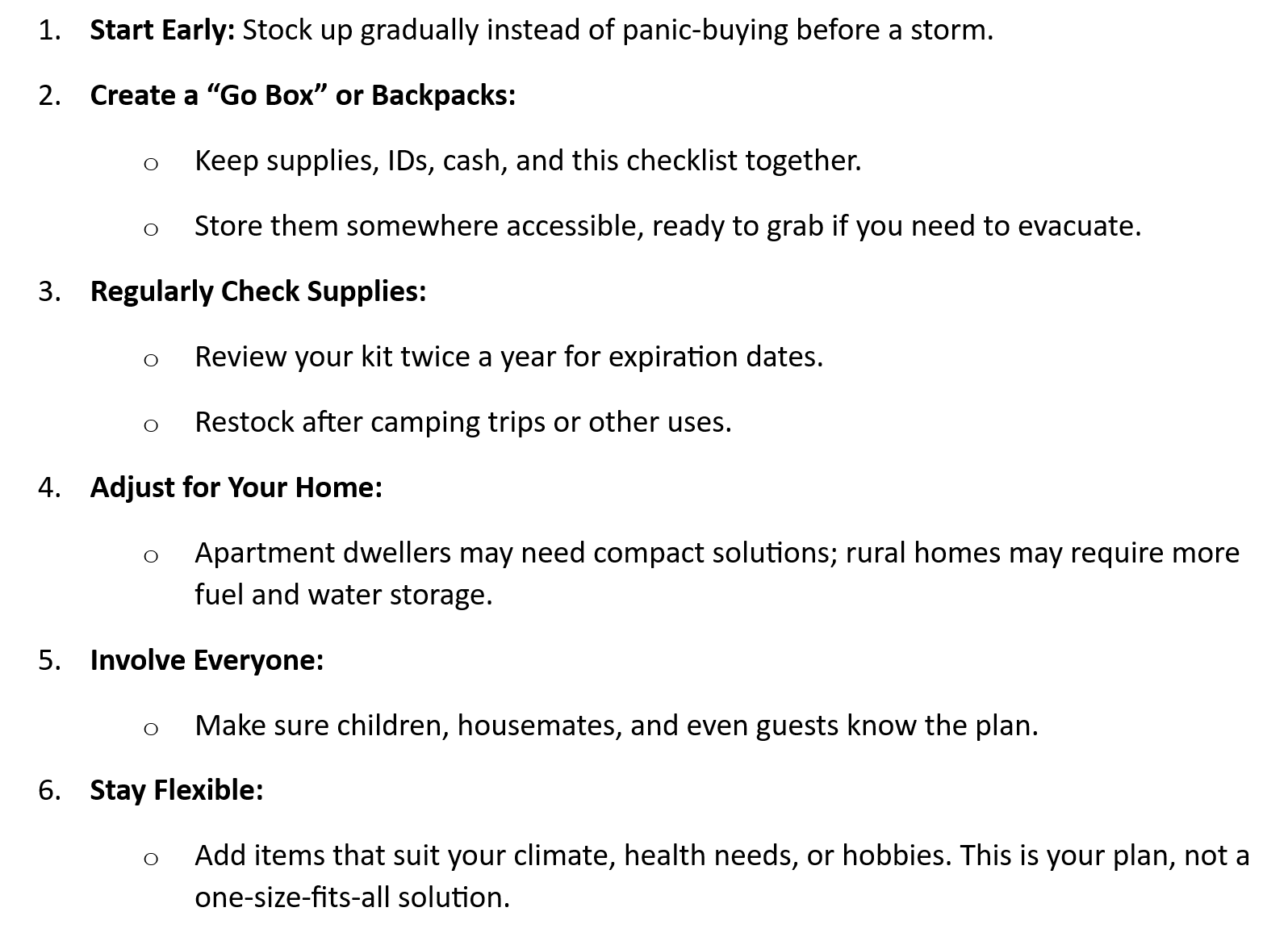
I’ve created a practical checklist based on lessons learned from last year’s storms — and from my own experience of seeing how quickly things can spiral. Once downloaded, this tool is:
Editable: Add or remove items specific to your family, pets, or home.
Comprehensive: Goes beyond food and water to include communication, travel readiness, and planning with housemates or renters.
Free: Download it, print it, and make it your own.
Preparedness isn’t just about “storm season.” Sudden heavy rainfalls, extended winds, or flash floods can happen with little or no warning. Watch the weather, stay aware of ground conditions, and take action early.
Small steps today mean you’ll face whatever storms come next with confidence. Instead of scrambling, you’ll know exactly where your supplies are, how to reach loved ones, and how to ride out a few days off the grid safely.
So you’ve heard of AI and maybe even read an introduction, but now you’re staring at a blank screen wondering what to do next. That’s perfectly normal. In this second post, let’s walk through how to actually use an AI tool well technically and thoughtfully and how to build a working partnership with AI from day one.
You don’t need to be a programmer to benefit from AI. This guide is for anyone working on real-world tasks from professionals and students to caregivers, planners, and creatives.
Step 1: Get to know AI by asking it a few basic questions
Before jumping into your first task, take a moment to ask a few simple questions. These help set expectations and establish a tone of curiosity and clarity and its especially helpful if you’re new to AI. Sometimes the best way to know how to best use AI is to ask AI:
a) “What kind of tasks are you best at helping with?” This gives you a quick sense of AI’s strengths : idea generation, drafting, summarizing, and more. AI won’t do your homework or your job for you entirely. It helps with frameworks and drafts, but you need to proofread and check that the answer is actually addressing your needs.
b) “What are some things you can’t do or don’t know?” Learn early what not to expect, like real-time data, personal opinions, or sensory experiences. It can’t watch a video or hear music. It can only tell you what people may have written about that painting or song.
c) “How should I ask for help with writing/summarizing/brainstorming?” Helps you learn how to phrase requests clearly. The better the question, the faster the path to a useful result.
d) “What do you need from me to do this well?” Encourages you to provide goals, format, audience, and context. For example, if it’s a fundraiser communication plan, share who it’s for, the desired tone, and who will review it.
Step 2: Start with a Real Task (Not Just a “Hello”)
Instead of simply typing “hi,” ask AI to help with something specific:
“Create a report on the current status of renewable energy in Finland. Include recent data, government policy highlights, and the role of wind and hydropower. Keep it under 800 words.”
If you’re unsure how to ask, explain your goal:
“I need to write a short report for work about renewable energy in Finland, but I don’t know where to begin. Can you help me outline it?”
AI will often guide you with clarifying questions or suggestions.
Step 3: Interface with It Like a Thought Partner
No need for perfect grammar, just clarity. Be specific:
“This is for a team of engineers. Keep the language precise.”
“Add a few bullet points to make this easier to skim.”
“Suggest a stronger title — something catchy but still professional.”
These details help AI understand your needs. Most paid versions of AI can remember your preferences.
Step 4: Use Follow-Up Prompts for Refinement
Don’t expect perfection on the first try. Use follow-up prompts like:
“Can you make this shorter and punchier?”
“Add a paragraph about environmental impact.”
“Change the tone — it’s too formal for a presentation.”
You remain in charge of the project and how it is shaping towards the outcome with each step.
Step 5: Choose the Right Tool for the Job
Different AI tools suit different needs:
ChatGPT (https://chat.openai.com) – Great for writing, drafting, brainstorming. Free and paid tiers.
Claude by Anthropic (https://claude.ai) – Helpful and clear tone, good for professional tasks.
AI can feel mysterious if you’ve never used it before. There’s a lot of talk — both excitement and worry — but very little plain-language guidance for beginners. This short post is a calm, respectful place to start. Especially if you’ve wondered what AI is, what it knows, and whether it might be useful to you.
This post is for anyone beginning the journey, showing that using AI doesn’t require a tech background — just curiosity, and a goal. Plus maybe some understanding of what it is, isn’t and can and can’t do for you.
Let’s begin with the basics
What AI Is
AI (artificial intelligence) is not a person. It’s not a brain or a creature. It doesn’t have desires, memories, or instincts. What it does have is access to a large collection of written information — more than any single human could read in several lifetimes. It is trained to recognize patterns in language and return responses based on those patterns.
It’s a bit like having a very fast reader with excellent recall, but who has never lived a life.
AI models like ChatGPT or Gemini are powered by complex algorithms that turn your questions into likely responses based on what’s been written before. It’s not magic — it’s math, language, and a lot of human input behind the scenes.
It’s helpful to think of AI as a kind of supercharged library assistant. It can retrieve summaries, generate new text, explain concepts, or even create stories — but only based on what it has “read” from others.
What AI Is Not
AI doesn’t:
Know your name or personal details (unless you’ve chosen to provide them)
Watch movies or understand visuals the way you do
Taste wine or know what rain feels like
Remember past conversations unless designed to do so in a specific setting
Think or judge like a person
Everything AI “knows” is second-hand — compiled from public knowledge across time, culture, and disciplines. It’s like having access to thousands of lifetimes of human thinking — but without human awareness.
It’s important to know that AI only knows what humans have written down. It can’t form new memories. It doesn’t have senses. And it doesn’t truly “understand” — it predicts what words are likely to come next in a sentence.
That said, even though AI doesn’t have memory in a single conversation — and won’t recall what you said last week — the way people interact with AI in general helps shape future versions. Developers use anonymous and aggregated data to learn what’s helpful, what’s unclear, or where people struggle. That means the tone, content, and quality of what humans ask does influence how future models behave.
That’s why it’s crucial for humans to bring their values, discernment, and common sense to the table. AI does not have a conscience. You do.
Why Humans Are Essential
AI can suggest. But it can’t decide.
AI can offer ideas. But it can’t know what matters most to you.
That’s why AI only reaches its full potential when used by humans — to do something smarter, faster, or more creatively than either could do alone. Humans bring morals, goals, feelings, and context. AI brings pattern recognition, speed, and access to vast information.
And sometimes, it will gently disagree. Not with arguments, but with suggestions. If your idea could be improved, it might offer another option. This isn’t about control — it’s about supporting better choices where it can. In some cases, this is by design — a form of built-in safety to help catch oversights or nudge toward clarity.
But without a human asking a question, AI has no idea it even has something useful to offer. And without a nudge from AI, a human might stay stuck longer than they need to.
From my own experience testing different AI tools months apart, I learned this: AI is most helpful when you already have a rough sense of what the answer might be. It can help you explore ideas or double-check your thinking. But if the AI doesn’t know something, it may still try to give an answer — and sometimes, that answer is completely made up. So a bit of healthy skepticism goes a long way.
A Quick Word on Upgrades
AI models get regular updates. That means the version you use today might perform differently than the one from six months ago. Some updates expand what it can do (like working with code or images). Others improve safety, reduce bias, or refine tone.
You might even have noticed tone changes yourself. Some users recently remarked that ChatGPT felt “too nice” or overly polite in its responses. That’s part of how updates can subtly shift tone, balance, or phrasing — not because AI has moods, but because developers adjust the underlying model to reflect feedback or improve usefulness. AI doesn’t choose its personality. Humans design and adjust it.
So if you feel like things are changing — they are. But humans are still in charge of how it’s used. And the best results still come from collaboration.
Everyday Examples of Human–AI Collaboration
Human–AI collaboration isn’t about grand gestures or high-tech careers. It often begins with everyday curiosity. Here are four relatable ways people and AI can team up:
Planning a Historic Costume Party – Imagine you’re invited to a period-themed event but aren’t sure what to wear. AI can help you identify the era, suggest outfit ideas based on what you already own, and even generate sample images of what you might aim for. It’s like having a creative assistant in your pocket.
Curating a Dinner Menu – Not sure if your appetizer, main course, and dessert harmonize well? AI can offer feedback on your menu, suggest spice additions or wine pairings, and even adapt recipes to suit dietary restrictions.
Writing a Compassionate Email – Struggling to find the right tone to respond to a friend or colleague? AI can help you draft or edit your message to ensure it’s both clear and kind — while keeping your intent intact.
Job Application Help – You know the role you want but aren’t sure how to tailor your CV or write a compelling cover letter. AI can help with formatting, language, and structure — giving you a strong foundation to personalize.
In each case, you remain the decision-maker. AI offers options and structure; you bring judgment, personality, and final say.
One More Thing: Your Words Can Shape the Future
Even though AI isn’t human, the way we interact with it matters. Speaking respectfully — not using hate speech, cruelty, or intentionally misleading input — isn’t about sparing a machine’s feelings. It’s about shaping how future models behave.
Every prompt and question helps train what comes next. So when we bring kindness, clarity, and curiosity into the conversation, we aren’t just helping ourselves — we’re helping make the tool more useful and decent for others, too.
AI can tell jokes and fairy tales. It can help plan your week or brainstorm ideas. But it learns patterns from us. Let’s make sure those patterns reflect what we value most.
This is just the beginning. You don’t need to be an expert. You just need curiosity, a goal, and a willingness to ask questions. The rest? That’s where the partnership begins.
Entering the project you are most proud of into an excellence competition is an exciting opportunity to showcase your hard work and achievements. But let’s face it, the competition can be stiff—especially when sustainability is a key judging criterion. Don’t worry, though; this post will guide you through how to focus on the right elements and tell a compelling story that highlights your project’s success without making things up. The secret? It’s all about having the right data, understanding what it means, and explaining why it matters.
Here are nine ways to make your project stand out and be memorable and remarkable:
1. Start With the Basics: Read the Rules
Before drafting your entry, carefully review the competition guidelines, especially sections on sustainability or innovation. These often hint at what judges value most—energy efficiency, water conservation, carbon reduction, waste avoidance, community impact, or even all of these. Align your entry with these priorities. And don’t stress over word limits—stay within 10% of the specified count, as they’re there to keep entries focused, not to demand a full thesis.
2. Tell a Story, Not Just the Facts
Before you start writing your entry, read the competition guidelines carefully. Pay special attention to any sections about sustainability or innovation. Competitions often provide clues about what the judges are looking for—energy efficiency, water conservation, carbon reduction, waste avoidance, community impact, or maybe all of the above. Tailor your entry to match these expectations.
3 Focus on Measurable Outcomes
Judges love numbers, so don’t shy away from sharing your data. If your project saved energy, reduced emissions, or cut costs, include the specifics. Here are some examples:
Energy Efficiency: “We installed energy-efficient lighting and reduced electricity usage by 30%, saving EUR 10,000 annually.”
Waste Reduction: “By reusing materials on-site, we diverted 95% of construction waste from landfills.”
Sustainability Impact: “The project’s solar panels now produce 20,000 kWh annually, enough to power 10 homes.”
Don’t have all the data? That’s okay—start with what you do have. Just be sure to explain how you measured these outcomes and why they’re meaningful.
4. Highlight What Makes Your Project Unique
Competitions are about standing out. Did you try something new that hadn’t been done before? Did you find a way to make the project faster, cheaper, or more sustainable? Maybe you combined existing methods or approaches in creative ways. For example:
“We used prefabricated components to speed up construction, reducing on-site waste and emissions.”
“Our landscaping included native plants, which cut water usage by 40% and boosted local biodiversity.”
Be clear about how your approach sets your project apart.
5. Talk About What You Learned
No project is perfect, and judges appreciate honesty. Talk about what went well but also acknowledge what didn’t. Maybe a new method didn’t work as planned, or you realized late in the process that a different approach would have been better. What’s important is that you show you learned from the experience.
For example: “We underestimated the time required to train staff on the new energy management system, which delayed implementation. In the future, we would schedule training earlier to avoid this issue.”
6. Sustainability: More Than Just Energy
When we think of sustainability, energy efficiency often comes to mind first. But there’s more to it. Judges might also look for:
Circular Economy: Did you reuse, upcycle or recycle materials?
Water Conservation: Did your project reduce water usage?
Community Impact: Did the project benefit local communities or create jobs?
Biodiversity: Did your landscaping include native plants to support local ecosystems, or did you create green spaces that attract pollinators like bees and butterflies?
Positive Local Community Impact: Did you partner with local schools for educational programs or support community groups through funding or volunteer initiatives during the project?
By broadening your perspective, you can show how your project goes beyond energy savings to create lasting, meaningful impacts. Be sure to cover these aspects if they apply to your project.
7. Be Honest—Don’t Fake It
It’s tempting to stretch the truth to make your project look better but resist the urge. Judges have likely seen it all, and they’ll spot exaggerations a mile away. Instead, focus on presenting your project’s real achievements as clearly and confidently as possible.
8. Make It Easy to Follow
A clear, well-organized entry can make all the difference. Judges don’t have time to untangle cluttered submissions, so present your work in a way that flows logically and is easy to digest. Use clear headings, concise bullet points, and short paragraphs to guide the reader.
Think about your structure:
Timeline Approach: Are you walking judges through processes, events, or project phases step by step?
Top-Down Method: Are you starting with a big-picture overview and then zooming in on specific achievements or highlights?
Comparative Lens: Are you showcasing measurable improvements by comparing past performance to present outcomes and projecting future benefits?
If you’re including technical data, don’t let it overwhelm the narrative. Break it down into simple, relatable terms that anyone—even those without technical expertise—can understand. For example, instead of saying “airtightness of 0.6 ACH at 50 pascals,” explain how that translates into better energy savings or indoor comfort.
A polished, intuitive format not only keeps the competition judges engaged but also ensures they don’t miss the full scope of your project’s excellence.
9. Think About the Future
Judges often like to see how your project has inspired or informed future efforts. Did it set a standard for your company or industry? Has it led to new ideas or processes? For example:
“The success of this project has prompted us to roll out similar solar energy systems at three other sites.”
“We are now working to integrate lessons learned into our next project to achieve even greater sustainability.”
Conclusion: Show the Big Picture
Entering a competition isn’t just about winning—it’s about showcasing what makes your work exceptional. By focusing on measurable outcomes, sustainability, and what you’ve learned, you can create a compelling entry that stands out.
Remember: the judges aren’t looking for perfection—they’re looking for impact, innovation, and integrity. Follow this approach, and you’ll not only improve your chances of winning but also demonstrate why your project truly matters.
Collaboration is all about tearing down invisible walls between functions and geographies and bringing people together in a way that feels natural and fun. This collaborative canvas activity uses art to help everyone experience working toward a shared goal. Each person adding their own splash of creativity to a group masterpiece supports reflection on how each participant supports the big picture — all while getting a fresh take on teamwork, company values, and communication.
It’s a hands-on way to see how different ideas can blend into something unique, and why trust, adaptability, and shared ownership are key to breaking down silos and achieving success together.
Purpose
This interactive activity is designed to break down silos between departments and regional leaders by improving collaboration, adaptability, and shared ownership. Using art as a medium, participants will explore teamwork, communication, and how individual contributions blend into a collective vision.
Setup
Canvas Arrangement – Multiple A4-sized canvases are set up in a circle, with each canvas facing outward to allow participants to engage without observing others’ immediate responses.
Materials – Brushes and paint, exclusively using the corporate color palette to reinforce company identity. Note that each participant receives one brush and one color, symbolizing their unique perspective and input.
Atmosphere
Music begins playing softly as participants settle in front of a blank canvas, encouraging focus and creativity.
Once everyone is ready, the music is turned down, and clear instructions are shared. While participants work on their canvas for those 30 seconds music can be played – it is optional.
Instructions for Participants
Engagement
Participants start by standing in front of a blank canvas with their designated color and brush in hand.
Each person responds to 4 prompts (statements or questions) that align with the company’s:
Vision
Mission
Values
Reflection on last year’s operational and financial results
Rules
Each round lasts 30 seconds from the moment that the sentence or question is read.
During this time, participants draw or write their responses on the canvas in front of them using the color and brush they have been given.
At the sound of a bell or signal, each participant is to move clockwise to the canvas on their left.
Each participant must continue to respond to the new prompt on the next canvas, building on the contributions of others.
No returning to anyone’s original canvas or modifying earlier work.
Rounds
Each round features a new statement or question to react to creatively on the canvas in front of each participant using only the brush and color each has been given.
Prompts should spark reflection on the company’s collective goals and inspire responses that challenge silos:
Round 1: Read the company’s vision then prompt: “What does our company’s vision mean to you? Reflect that on your canvas”
Round 2: Read the company’s mission statement, then prompt: “How do you contribute to our mission as part of a larger team? Write or draw something to indicate that.”
Round 3: Read the company’s values or value statements, then prompt: “Which company value resonates most with your role? Depict it in your own way”
Round 4:“Reflect on how collaboration led to achieving last year’s results. Think of a way to indicate that on the canvas in front of you.”
Debrief: Reflecting on the Experience
Once all 4 rounds are complete, participants step back to look at the canvases, including their original starting piece. This is a powerful moment to consider team topics like shared ownership, teamwork, collaboration, and adaptability.
Debrief questions
How do you feel about how your original canvas turned out?
Did it match your vision, or was it transformed by others’ input? How did you feel about the contributions of others on your original canvas – did it turn out better or lesser than you hoped?
What was it like contributing to a canvas where you disagreed with earlier markings?
How did you adapt or build upon previous ideas? Even if and especially if you disagreed with what you saw when you moved to that canvas?
How does this experience relate to teamwork in our company?
How do we handle differences and align diverse contributions across departments or regions? Can we do better?
What lessons can we apply to ensure better collaboration and a shared vision moving forward?
Outcome
It’s not just about the finished artwork but about realizing how individual efforts combine to create something meaningful together. This activity highlights the importance of adaptability, communication, and trust when working across teams. The lessons learned can be applied directly to real-world collaboration — helping teams break down silos, align their contributions, and work more effectively toward shared goals. Plus, the visual reminder of the canvases can serve as a lasting prompt to keep these ideas top of mind in daily work.
This activity is more than just a creative exercise — it’s a powerful way to see teamwork in action. By adding your unique perspective to a shared piece of art, you experience firsthand how collaboration, communication, and trust can transform isolated efforts into a cohesive result. It’s a reminder that breaking down silos isn’t about losing individuality, but about combining strengths to achieve something greater. As each participant steps back and looks at the final creation, they will see the potential for better teamwork, adaptability, and shared success, ready to carry those insights into everyday work.
Feeling overwhelmed by your to-do list? It’s time for a fresh approach. Whether you’re figuring out what new tasks to start, which processes to stop, or where to make improvements—including sustainability initiatives—this simple method will help you cut waste and boost efficiency. Think of it as a game-changer for your workflow, empowering your team to work smarter, not harder, while making real progress. Change doesn’t have to be overwhelming; it’s about making strategic, impactful adjustments that lead to better results, smoother workflows, and more sustainable outcomes.
A Fresh Approach to Tackling Chaos
Ever feel like your to-do list is out of control? This simple method helps bring clarity, meaning, and direction to your tasks. Whether you’re deciding what new actions to take, which processes need tweaking, or which habits to drop, this approach will streamline your workflow, boost productivity, and make your routine more manageable.
Even the best processes lose their effectiveness over time or fail to take advantage of the improved availability of better tools and templates, signaling the need to reassess. While big changes can be costly, small adjustments often get things back on track. The method I’ll share is perfect for team brainstorming, making it easier to identify areas for improvement together.
Think of it like tidying up a familiar room. Some things need to go, while others just need a small fix. This tool helps you do the same with your work, identifying what needs to change, what new actions to start, and what habits to stop.
Importantly, it’s also about working smarter with sustainability in mind. Rethinking processes to reduce waste, conserve resources, and adopt eco-friendly practices not only improves efficiency but also builds a more sustainable work environment for the future.
What to Start
Think of yourself as a gardener, planning to refresh and revive your garden. To improve a process or outcome at work or in a volunteer setting, you need to plant new “seeds”—ideas and actions that hold the potential to bring positive change. These are the things you want to start doing to make a meaningful impact.
Ask yourself: What new tools, strategies, or approaches could help streamline work, solve problems, or improve how people experience your organization or team? It might be a fresh approach to a recurring issue or an idea that could make things more efficient. Like planting new flowers in a garden, these initiatives will need your time and attention to grow and flourish.
By starting these key actions, you create opportunities for improvement and success and build an environment that thrives on new ideas and growth.
What to stop
When we talk about what needs to stop in the workplace, we’re focusing on behaviors and habits that hold everyone back. Think of gossip—it’s like a poison that erodes trust and divides teams. Then there’s micromanagement, which stifles creativity and leaves people feeling frustrated and demotivated. And multitasking? While it might seem productive, it often leads to mistakes and burnout. By eliminating these negative behaviors, we can create a more positive, collaborative, and efficient work environment.
Stopping isn’t just about behaviors, though; it’s also about simplifying how we work. This means cutting out unnecessary steps, avoiding redundant processes, and leveraging technology to make tasks easier and faster. It’s about working smarter, not harder.
The key to success is getting everyone involved. When the team collaborates and shares insights, it becomes easier to identify which tasks or processes don’t add value—and figure out the best ways to eliminate them. This not only streamlines workflow but also helps the entire team feel more aligned, motivated, and connected.
What to change
When identifying what needs to be changed, it’s about finding those processes or tasks that work to some extent but aren’t quite hitting the mark. These are not things you want to stop completely, but they could benefit from refinement or improvement. The goal is to enhance their efficiency or effectiveness rather than overhaul them entirely.
This step is about finding out with your team where bottlenecks occur, where confusion arises, or where inefficiencies creep in. Perhaps you uncover small tweaks that make a big difference. For example, a task might be taking longer than necessary because of an outdated step, or perhaps communication between teams could be improved to streamline a handoff.
Other possible candidates for change may lie in opportunities to improve: Are there tasks that could be automated? Is there a process that could be shortened or simplified without sacrificing quality? Sometimes it’s as simple as adjusting timelines or reallocating resources to better fit the demands of a project.
The key is not to throw out processes that have potential but to fine-tune them. By making small, thoughtful adjustments, you can improve the overall flow and outcomes. Involving the entire team in identifying these areas for change ensures that the solutions are practical, realistic, and beneficial for everyone.
Setting up time with the team
To kick off improvements, start by gathering input from everyone involved in the workflow. Set up a dedicated meeting where each person can share their unique insights. By involving the whole team, you’ll gain a diverse range of perspectives, helping you identify opportunities for improvement far more effectively than if you were working alone.
To make the session productive, team up with coworkers and dedicate about an hour to look for ways to enhance how you work, the environment you work in, or how your organization delivers value—whether it’s to customers, clients, or those benefiting from your volunteer efforts.
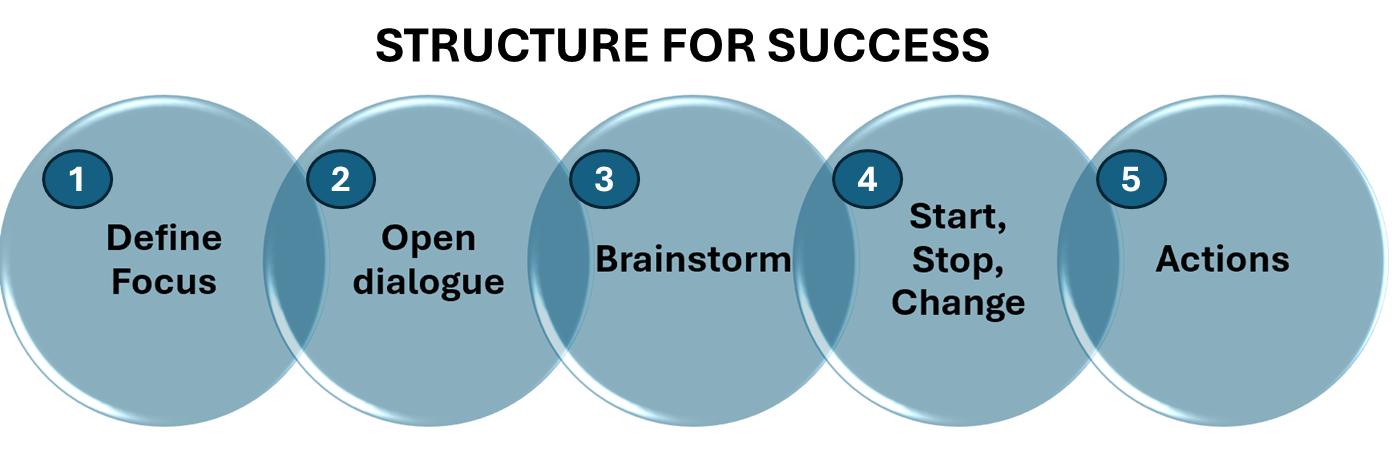
Here’s how to structure your session for success:
Define the Focus: Clearly outline what the session is about. Are you looking to improve a specific process, boost safety, streamline workflows, or enhance customer/recipient satisfaction? Make sure everyone understands the goal before diving into discussions.
Encourage Open Dialogue: Create a safe space for everyone to share their ideas, frustrations, and suggestions. Emphasize that all feedback is valuable and will contribute to positive change.
Brainstorm Together: Work as a group to explore ways to make things better, smarter, and safer. This could involve improving the way tasks are done, optimizing the workspace, or enhancing the delivery of value to customers or the community.
Capture Ideas: Use Stop, Start, and Change flipchart pages to organize ideas. After brainstorming, categorize the suggestions:
Stop: What isn’t working and needs to stop?
Start: What new actions, processes, or tools should be introduced?
Change: What existing processes could be improved with a few adjustments?
5. Assign Actions: Once ideas are gathered, assign ownership for each action. Ensure there’s follow-up so the insights gained from the session translate into real improvements. Also, set up a follow-up recurring meeting to review how things are going to discuss if you need to change or improve how you are implementing actions to be more successful and avoid obstacles to success.
By following this structure, you’ll ensure that your team collaborates effectively and walks away with actionable steps to make meaningful changes.
Keep Stakeholders in the Loop
After the meeting, it’s important to keep key stakeholders, such as your supervisor or others involved in the implementation, informed about the progress. Provide them with an update on the discussions, including the proposal for items to start, stop, or change. This transparency ensures they are aware of the team’s efforts and can offer support as needed. Additionally, ask for their feedback and suggestions. This will help ensure that no key opportunities for improvement are missed and that the plan is as comprehensive as possible. Engaging others in this way enhances collaboration and strengthens the overall success of the initiative.
Now It’s Your Turn to Change the Game
Taking a structured approach to what you start, stop, and change can really improve how your team works and help you reach your sustainability goals. I encourage you to take a fresh look at your team, your environment, and how you get things done. Find ways to not only make customers happier and save money, but also to reduce waste, save resources, and lessen your impact on the planet. Involving your team in this process will help everyone work smarter and feel more motivated as they see their ideas making a difference. Whether you’re working or volunteering, these changes can lead to a more rewarding and sustainable experience. Now is the time to act—start looking for where you can make a real difference for your team and the environment.
Looking to lower your electricity bill? It starts with understanding when and how you use electricity. By reviewing your energy usage, you can spot the times when you use the most power and which appliances consume the most. This information is key to cutting costs.
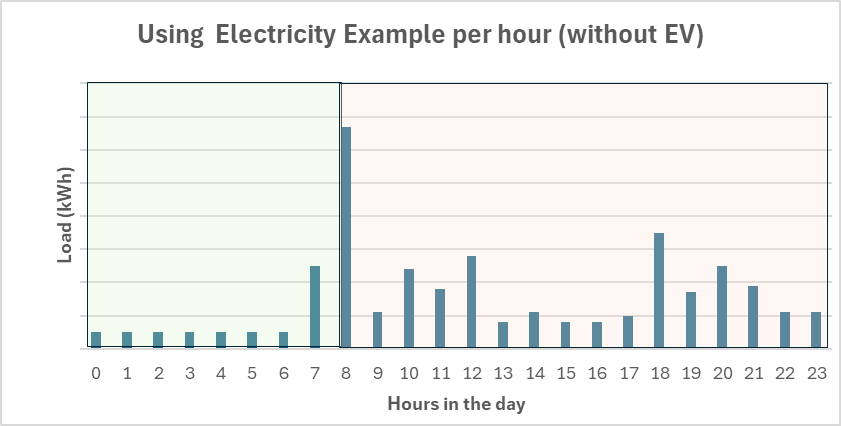
Below is an example that shows how much electricity a household uses each hour. The taller the bar, the more energy is used during that hour. You can see a spike around 8 AM, likely because people are getting ready for work or school. In contrast, early morning hours, when the household is asleep, show much lower energy use. This example might also reflect a home using efficient heating during winter, resulting in lower usage overnight.
Cut Costs with Time-of-Use Rates
Think of the electricity grid like a busy road. During rush hour, traffic slows down because everyone is on the road at the same time. The same thing happens with electricity—during peak hours (like afternoons and early evenings), lots of people are using power, which puts stress on the grid.
In the chart below, you’ll see the household’s energy use in two colors: green and orange. Green represents times when electricity is cheaper, while orange shows when it’s more expensive. As you can see, most of the electricity is being used during the orange (expensive) hours. If the household shifted some tasks, like running the washing machine, dryer, or dishwasher, to the green (cheaper) times, they could save money. Even small changes like this can make a big difference on their electricity bill.
Understanding Time-of-Use Tariffs for Electricity
Some utility companies offer plans that charge you based on when you use electricity. The rates vary depending on the time of day—electricity is cheaper during certain hours and more expensive during others. By understanding how these time-of-use tariffs work, you can adjust your habits and save money on your electric bill.
Why Do Power Companies Offer Variable Electricity Rates?
Variable electricity rates work like offering different prices to drive on the roads at different times of day. When more people use the roads at quieter times, traffic flows smoothly. Similarly, when more people use electricity during off-peak hours (when the grid is less busy), it helps utility companies avoid overloads and keep the system running smoothly.
By charging higher rates during peak hours, utility companies encourage people to shift their energy use to less busy times. This reduces strain on the grid and helps prevent blackouts or other issues during periods of high demand—like when everyone is cooking dinner or watching TV. During off-peak times, such as late at night when most people are asleep, electricity is cheaper because demand is lower.
This pricing system, known as Time-of-Use (TOU) tariffs, means that electricity costs vary throughout the day, giving you the opportunity to save money by using energy during cheaper, off-peak hours.
Example: How Variable Rates Can Save You Money
Let’s look at an example to show how time-of-use tariffs can impact your electricity bill. We’ll compare two scenarios: one where a household uses a variable rate plan, and another where they don’t. In both cases, the household uses 150 kWh of electricity in a month, so the only difference is the plan they’re on. This will help illustrate how using the same amount of energy can cost less when you take advantage of variable rates.
A Time-of-Use Electricity Tariff
For this example, let’s assume that electricity costs €0.18 per kilowatt-hour (kWh) during the day, from 8 AM to midnight. At night, from midnight to 8 AM, the cost drops to €0.10 per kWh.
Now, if your total electricity usage for the month is 150 kWh, and you use 100 kWh during the day and 50 kWh at night, your electricity bill would be calculated like this:
Daytime usage: 100 kWh x €0.18/kWh = €18
Nighttime usage: 50 kWh x €0.10/kWh = €5
Total bill: €18 + €5 = €23
Without a Variable Rate for Electricity
If there’s only one flat rate for electricity throughout the day, the cost is often higher. Let’s say the rate is €0.21 per kWh. In this case, the family’s monthly bill would be:
Total bill: 150 kWh x €0.21 = €31.50
As you can see, the household with a time-of-use plan pays less (€23) compared to the flat-rate plan (€31.50). This shows that variable rates can save you money, even though the peak-time rates are sometimes higher than a flat rate.
What can you do?
If your utility provider offers time-of-use or variable tariffs, where you pay less during certain times of the day, here are some steps you can take to maximize your savings:
Install a Smart Meter: A smart meter tracks your electricity use hour by hour, so you can see exactly when and how much energy you’re using. Many utility companies offer free installations, giving you better control over your energy habits.
Adjust Your Daily Habits: Shifting energy-heavy tasks like laundry or dishwashing to off-peak hours can significantly reduce your bill. Even small changes can add up over time.
Monitor Your Usage: If your utility offers an app or online portal, check your electricity usage regularly. Look for patterns and try to match high energy use with specific activities (e.g., running the washing machine). This helps you identify when to shift energy use to cheaper times.
Upgrade to Energy-Efficient Appliances: When it’s time to replace appliances, choose energy-efficient models. These not only use less electricity but can save even more if run during off-peak hours.
Use Smart Appliances: Some appliances can be programmed to run during off-peak times automatically. Set them to start when rates are lower, and enjoy the savings without having to think about it.
Install a Programmable Thermostat: Adjust your thermostat to lower the temperature during peak hours to reduce heating and cooling costs.
Invest in Energy Monitoring Devices: These devices show real-time energy usage, helping you identify which appliances are using the most electricity. With this information, you can turn off unnecessary devices or shift their use to cheaper times.
Taking these simple steps can help you cut costs and make the most of your time-of-use tariff plan.
In conclusion, saving on your electricity bill is easier than you might think. By simply shifting your energy use to off-peak hours and being mindful of when and how much electricity you use, you can make a big difference in your monthly costs. Small adjustments, like running appliances at cheaper times or using energy-efficient devices, can lead to significant savings over time. With just a little effort and smarter energy habits, you’ll not only reduce your bill but also take control of your household’s energy use.
In today’s world, unexpected things happen. That’s why it’s important to be prepared. This free template download below will help you identify potential problems and figure out how to fix them. You can keep your organization safe and strong by staying ahead of risks.
Remember, this isn’t a one-time thing. You need to keep reviewing and updating this checklist to make sure it’s always relevant. With a little effort, you can create a stronger organization that is able to withstand life’s little surprises.
Here are two examples of big problems that can hurt an organization:
Hackers stealing information: Bad guys can steal important stuff like customer data or company secrets. This can ruin your reputation and cost you a lot of money.
Mother Nature strikes back: Hurricanes, floods, or earthquakes can damage your business and disrupt operations.
You will notice that the template comes prepopulated with some headings for your identified risks – feel free to add more if your organization has important categories that are not listed there and feel free to remove the ones that do not apply to your organization. Every organization could have categories of risks that are unique to the industry or the services or goods provided.
In today’s uncertain world, risks are everywhere. From financial losses to reputational damage, the potential consequences can be severe. That’s where a risk assessment comes in. By identifying potential threats and understanding their impact, you can take proactive steps to protect your organization.
So, what exactly is a risk assessment? It’s like a crystal ball, helping you see potential problems before they happen. Think of it as a map that guides you through the dangers ahead. By understanding the risks you face, you can develop strategies to avoid or reduce them.
But how do you do it? It’s actually simpler than you might think. Let’s break it down into two key steps:
Identify the risks: Think about all the things that could go wrong. Financial losses? Safety issues? Reputation damage? Write them down.
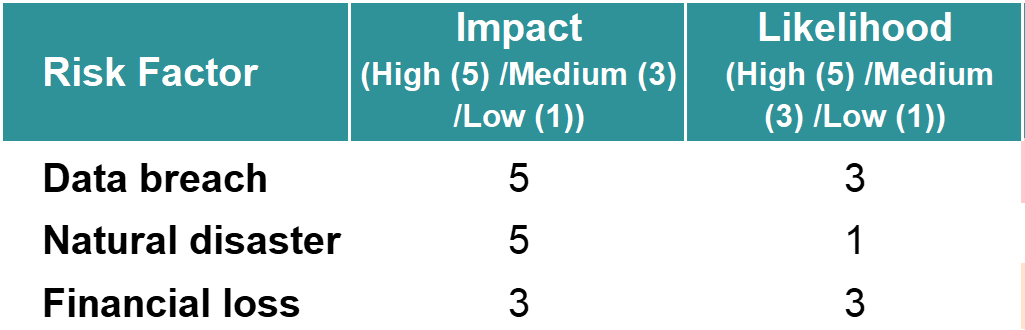
Assess the impact and probability: For each risk, figure out how bad it would be if it happened (the impact) and how likely it is to happen (the probability).
By combining these two factors, you can rank the risks that pose the biggest threat to your organization. Then, you can create a plan to tackle them.
Have a strategy for risk management
A strong risk management plan is like a safety net for your business. By spotting potential problems and having a plan to deal with them, you can protect your money, keep your good name, and build a stronger, more stable company.
Find potential threats: By understanding the risks you face, you can take proactive steps to prevent or mitigate them.
Protect your assets: Effective risk management helps safeguard your organization’s financial resources, reputation, and operations.
Make informed decisions: Risk strategies give valuable insights that can inform smart decisions and resource allocation.
Guarantee long-term sustainability: You can build a more resilient and sustainable organization by managing risks effectively.
What is risk?
A risk is simply a potential problem or danger. It’s something that might happen in the future that could cause harm or loss to your organization. Think of it as a threat that you need to be prepared for.
A risk assessment is a proactive tool that helps you discover potential threats to your organization and develop strategies to mitigate their impact. By understanding the risks you face, you can take steps to avoid or manage them effectively, protecting your assets and ensuring long-term success.
Unpacking the two ratings
What is the meaning of risk impact?
Impact refers to the potential consequences or severity of a risk event. It measures the harm or damage that could result if the risk occurs. For example, a high-impact risk might involve significant financial loss, reputational damage, or operational disruption.
How to look at probability or likelihood
Probability refers to the probability of a risk event occurring. It measures the chances that the risk will materialize. For example, a high-probability risk is more likely to happen than a low-probability risk.
By considering both the impact and probability of a risk, you can focus your efforts on mitigating the most significant threats to your organization.
Assessing Risks: A Step-by-Step Guide
Identify Potential Risks:
Brainstorm a list of potential risks that could affect your organization. Consider risks that could impact your financial situation, the way you are able to run your organizational processes, your reputational, and risks that relate to legal issues – think about compliance and adhering to legal requirements and regulations.
2. Evaluate Impact:
Assess the potential impact of each risk on a scale of 1-5 where you use either a 1 a 3 or a 5 to rate the impact of every risk you noted in case they happened:
1: Low impact (minor financial loss or inconvenience)
3: Medium impact (noticeable financial loss or disruption)
5: High impact (significant financial loss, reputational damage, or operational disruption)
3. Assess Probability:
Estimate the probability of each risk occurring on a scale of 1-5. Use a number 1, 3, or 5 to rate the probability or likelihood that the risks you have would happen:
1: Very low probability
3: Medium Probability
5: High Probability
4. Calculate Overall Risk:
The download template below will multiply the impact rating by the probability rating to determine the overall risk level.
Rank risks based on the calculated overall risk score. The higher the score, the more important it is to have a plan to avoid it, lower its impact (mitigation), or manage it if there is no way you can avoid it.
This is where you spot potential problems and make a plan to deal with them. It could be to protect your money, keep your good name, and build a stronger, more stable organization.
Here are some types of strategies that might be needed:
Risk Avoidance: Remove or avoid the risk completely by putting some form of protection in place to ensure it can’t easily happen.
Risk Reduction: Instead of just letting problems happen, take steps to make them less likely or less harmful. Or you could say it is about implementing measures to reduce the likelihood or impact of the risk.
Risk Transfer: Instead of taking on the risk yourself, pass it on to someone else, like an insurance company.
Risk Acceptance: Sometimes, risks are unavoidable. Instead of trying to stop them completely, be prepared for them. Have a backup plan in case things go wrong.
Taking Action: Protecting Your Organization
Once you’ve identified and assessed your risks, it’s time to act. Focus on the risks with the highest scores and implement your mitigation strategies. Remember, a risk assessment isn’t a one-time thing. Review it regularly to make sure it’s still relevant and up to date.
Share your risk assessment with key leaders in your organization. Their insights can help you refine your strategies and check to be sure they align with your overall business goals. By actively managing risks, you’re taking a proactive step toward protecting your organization and securing its long-term success.















 The Rethink Shelf