Analyze how you use your time


“All we have to decide is what to do with the time that is given us.” (Gandalf)

J.R.R. Tolkien, The Fellowship of the Ring

How you choose to spend your time is a good indicator of the activities and people who are most important to you in your life. It shows your priorities clearly. How well do your daily activities reflect your priorities?

Have you faced any of these challenges?

Personal Development. Maybe you have considered taking an evening class to improve your skills or obtain a qualification you need, but you are not sure how you will find time to attend that class because of your busy life.  Taking a closer look at how you spend the time that you do have may help you see opportunities to change your schedule and make more time for career development activities.

Leaders and managers have many priorities to manage and often feel there are not enough hours in every day to accomplish the business objectives they have set for themselves and their teams. Taking a closer look at how you spend every day and every week my give you some interesting insights. You may discover areas where you could refocus yourself or delegate activities to free up more time for those other priorities.

Performance feedback could be indicating that your supervisor/manager feels you are not using your time at the office in productively. This template can also help you discover where he or she may be right and whether you are actually using your time optimally to achieve the performance goals that you and your boss have agreed upon.
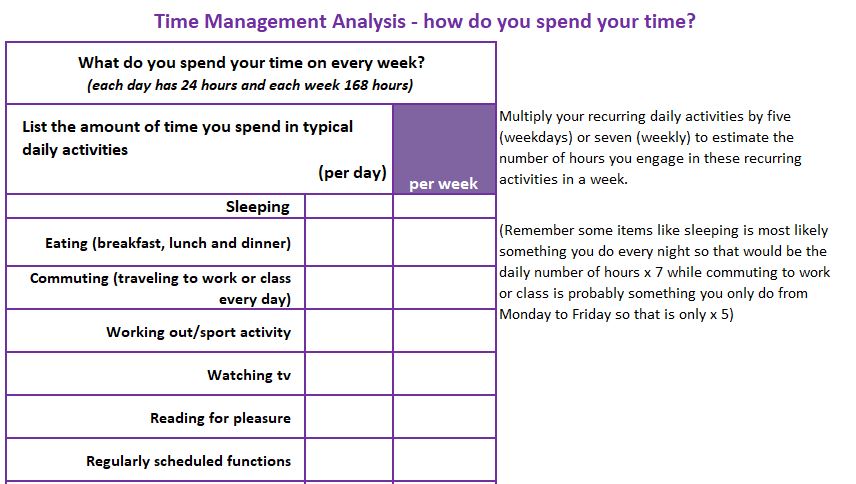
The template, which you can download below, helps you to take stock of what you are doing with all of the time that you have available to you. I once discovered that 30% of my time was at my own discretion and I created a mantra for myself “make the 30% count.” Whenever I caught myself involved in an activity that I had labeled as of low value to me given my own goals and values, I would just remind myself of the mantra and shift my focus to a higher value activity.

Should you need more development in how to be more effective at work, I suggest you look for a class on time management tools. These classes typically focus on how to get better at email management, how to better plan your day to do the right type of activities at the right time of the day (energy management) and also how to get better at keeping track of your highest priorities and making sure that you are working on the right items at various check-in moments with yourself during the day. A coach or a buddy can also help you with this by not only sharing tools with you but also helping to keep you accountable for the goals and outcomes you have committed to.

I hope your efforts to take a closer look at how you spend your time has given you the awareness of how much time you have available to spend at your own discretion. Are you using your time wisely? Are you doing things that will get you closer to the goals you have for your life?

I found one has to repeat these quick checks on a regular basis – maybe every 6 months – to make sure you are still on the path you had set for yourself when it comes to being in charge of the time you have.

Preparing to give employee feedback – Template


feedback

Feedback: A Two-Way Street

Giving and receiving feedback can be a delicate dance. It can be uncomfortable for both parties involved at times. However, it’s an essential part of growth and development. By getting better at giving feedback, planning what to say and opening the door to an open and honest discussion, we can help employees reach their full potential while driving organizational success.

This template helps a manager or supervisor think through the important aspects of giving feedback to an employee and helps to plan and prepare for the actual feedback meeting.

The template and approach also helps plan positive feedback to employees. This aspect is often neglected, but equally valuable in helping employees understand what specific actions and communications are valued and should be continued.

Some reminders:

  • Never give important feedback via an email or sending this worksheet to the employee. It should always be done in person or at least through a phone or video call. – if an in-person meeting is not possible.
  • The feedback should be given as soon as possible after the event to minimize surprises at the structured annual performance feedback meetings and to ensure the employee still has a good recollection of the situation or event that took place.
  • Do allow the employee to respond once you have shared the feedback to ensure that your message is understood by the employee and to allow you to understand any nuances to the situation which you may not have been aware of.
  • It is always a good idea to agree on a check-in moment at some time in the future. This is an opportunity to see if the employee may have further questions or comments at that time or perhaps he or she has been working on improving a particular skill related to the feedback you had shared and perhaps he or she could have some successes to share with you!

Sharing feedback with an employee, when it is not positive, can be tough to execute even with a tool like this. It depends a lot on your own style for managing conflict and whether you prefer to avoid conflict or situations where people may be upset with you. Take some time to learn more about your own conflict management style if giving feedback to employees remains a challenge for you even when you have used the template to prepare for the conversation.

Delegate Smarter, Not Harder: A Practical Tracking Solution


Delegation isn’t just about offloading work; it’s about developing your team’s potential. By strategically assigning tasks, you not only free up your time but also equip your employees with new skills and responsibilities. However, keeping track of who’s doing what can be challenging. That’s why a clear system for delegating and monitoring tasks is essential for maximizing productivity and employee growth. The template I am sharing is a great way to keep track of not only who is working on which delegated task, but also what was the overall purpose of the delegated task.

Try to match the task or activity/project you need to delegate to the right person in your team given their current skills and competencies and also matched to current development needs each of them have.  The template is based on a list of categories to consider: (see second tab in template for the definitions shown below)

The delegation tracking sheet helps you keep track of the level of capability the person has – which uses the definitions above to help remind you how much support he or she might need with that task.

Use the drop down list in column B to select the category that applies to that task/project and the person that you are delegating to.  You can create more lines for delegated tasks by just inserting a line between the existing lines.

Reasons why this list can be very useful:

  • Keeping this list up to date and referring to it in a regular basis will help you remember when to check in on someone working on a delegated task or project.
  • You keep track of the reasons why you gave a specific task to someone – from a developmental perspective. This means you know how much support and coaching may be needed while the person is working on this task.
  • Avoid giving the same task to more than one person. There is nothing more demotivating to an employee than finding out another colleague is working on the exact same project as he or she is after having already spent several hours doing research and talking to people about the project in order to deliver a great result.

You can do more and accomplish more as a manager when you don’t have to rely on your memory alone to remember who is working on which tasks and projects for you.

Effective delegation is the cornerstone of successful management. By utilizing this template to track delegated tasks, managers can optimize workload distribution, identify development opportunities for team members, and ensure that projects stay on track. This proactive approach not only boosts productivity but also builds a culture of empowerment and growth within the team.

Presentation Feedback Template


Conducting presentations at the end of developmental assignments is a common way for employees to share knowledge and demonstrate the value of his/her contribution to solving a situation or creating a new solution.

Presentations is also a great way to evaluate how much an employee has learned from an assignment, if you are the manager, mentor or L&D Partner supporting that function or project. Just telling someone that he or she did a “good job” at the end is not a substitute for specific and actionable feedback which a structured template can offer those attending the end-of-assignment presentation.

Structure

  • The structure of the end-of-assignment presentation typically would include these topics:
  • About the presenter – brief bio including background experience up to the assignment, role during the assignment and career ambitions and goals.
  • An executive summary of the solution provided or improvement implemented.
  • Brief overview of the Situation that had to be addressed, specific objectives identified and met and the team that were involved in addressing the situation.
  • Outcome achieved including metrics and recognition for support from other people and groups.
  • Summary of key learning points that the employee takes away from the assignment and will use in future
  • Questions and Answers session

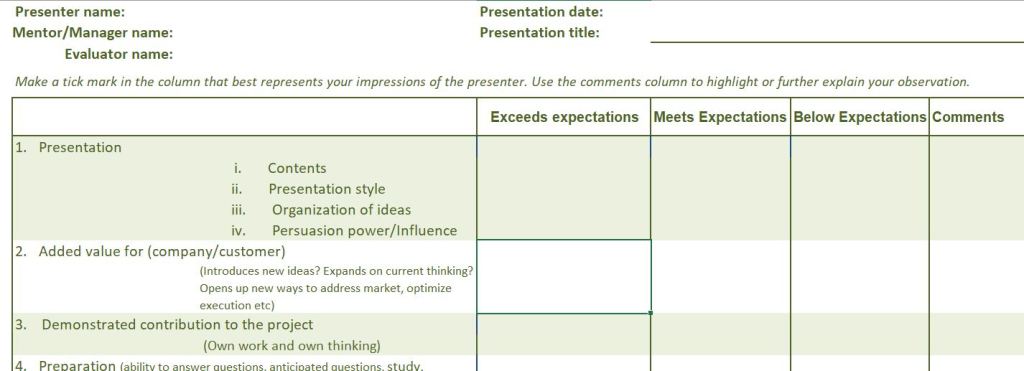
The templates I am sharing include the Presentation Feedback Form which can help those attending the presentation to structure their feedback to the presenter (the assignee) in a consistent way. An HR or Training/Learning/ Development representative can collect all the feedback forms afterwards and collate those into one feedback document for the benefit of the assignee.

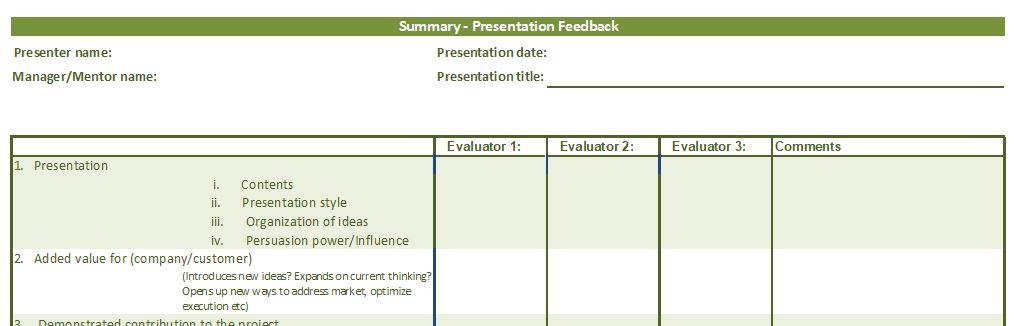
The second template is for the HR or L&D person who will combine all of the feedback received onto one Summary sheet which can be shared with the presenter. The feedback can offer helpful developmental suggestions and also recognize the successes and achievements that the presenter was able to demonstrate during the presenttion.

Tips:

  • Customize the first column to include specific details around developmental objectives that were set as a part of the assignment. That way the presenter gets very specific feedback on how well he or she met those expectations through the presentation and handling questions during the session.
  • Be sure to prepare those who would provide feedback so they understand how feedback is to be captured on the form – sometimes they are confused about the columns and you may even prefer to just have one column with a score. Specifically ask them to add comments to help enrich the feedback and make it easier for the presenter to understand how to improve on his or her performance in future.
  • Deliver the feedback in person (vs by email) once the combined Feedback form is completed. Presenters may have further questions on how to interpret the feedback or how to improve on their own performance and should have the opportunity to get guidance and coaching on that during the feedback meeting to optimize the learning opportunity.

Personal Development Plan


Continuous learners have the best chances of being noticed for new opportunities and promotions. It is important to be structured around what you will focus on learning next. Ask for feedback from more senior people around you or from your manager/supervisor. Then create a personal development plan for yourself. As you complete learning goals, set new learning goals and update your personal development plan accordingly.

The best way to have a structured learning approach is to have a Development Plan. Creating your own development plan is the first step towards mapping out your learning needs and priorities. Ask someone with experience to help you with it. It could be your supervisor or manager and it can also be a coach or mentor that you are working with. Such a person should be able to provide you with valuable feedback as you aim to prioritize your planned development actions.

Start the plan

Continue reading “Personal Development Plan”

Employee Satisfaction Score


Smiley Charts

Sometimes you don’t want to run a full employee engagement survey, but you just want to do a quick check to see how things are going. Call it a “mood meter” or a high level check to see if you can catch some underlying issues that may require further investigation.

Of course it is understood that a quick check is not meant for applications where the correlation between questions and outcomes require a statistically defensible position. HR folks and OD folks sometimes just need a quick tool that would help you see if there may be a trend that is worth looking into further at your location. Sometimes the trend you see can be as simple as a low level of responses to your quick check.

Continue reading “Employee Satisfaction Score”