Onboarding Checklist: Set New Hires Up for Success


First impressions matter, especially when it comes to new hires. A well-structured onboarding process is crucial for setting employees up for success. By providing clarity, support, and a warm welcome, you can accelerate their productivity and boost job satisfaction. This process can be more successful when you create a plan and share it with the hiring manager and the new hire..

Onboarding: Your New Hire’s First Impression

A strong onboarding process is essential for employee satisfaction and retention. It’s not just about paperwork and introductions; it’s about setting new hires up for success from day one. By providing clear expectations, necessary tools, and a supportive environment, you can accelerate their productivity and foster a sense of belonging. Let’s explore how a well-structured onboarding checklist can make a difference.

People centered HR Processes MODEL

Laying the Groundwork for New Hire Success

A successful onboarding experience starts before a new employee even walks through the door. By planning and coordinating tasks in advance, you can create a seamless transition. This involves everything from communicating expectations to the new hire to aligning key stakeholders. The key players in setting up the plan and ensuring that everyone is ready to support the necessary meetings and onboarding discussions are usually the HR business partner and the Hiring manager. Effective onboarding isn’t just about paperwork; it’s about setting the stage for long-term employee satisfaction and productivity.
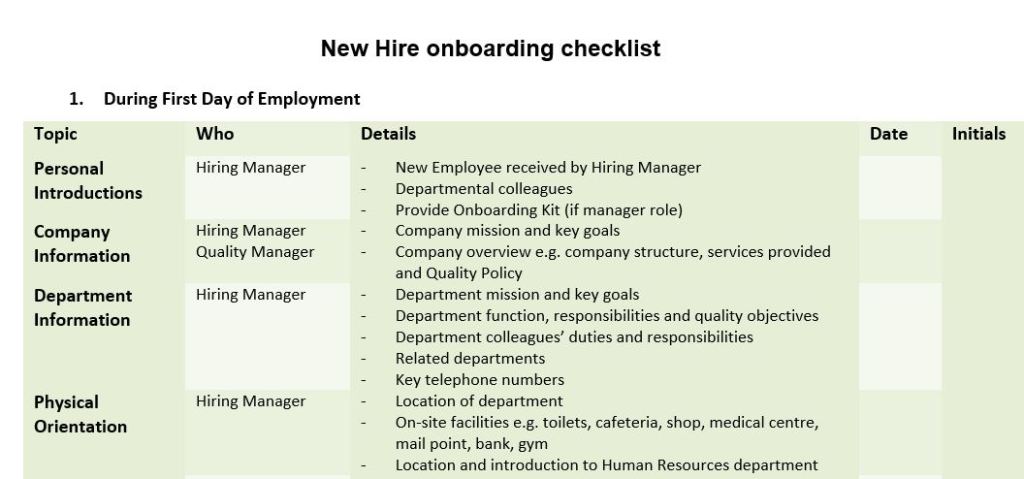
This template is a basic version and you should add your own additional items to help new employees understand your industry and company plus know how to navigate the office building, and business better. If the new employee will be in a customer-facing role you may need to include introductions to customers too.

A well-structured onboarding process is your secret weapon for talent retention and productivity. By providing a clear roadmap for new hires, you not only accelerate their ramp-up time but also create a positive and lasting first impression. Remember, a smooth onboarding experience sets the tone for an employee’s entire tenure.

Boost Teamwork with an Indoor Scavenger Hunt


Looking to inject some fun and creativity into your workday? A scavenger hunt is a fantastic way to boost team morale, encourage collaboration, and foster a sense of camaraderie. Whether you’re in a bustling office or a quiet workspace, an indoor scavenger hunt can be a refreshing break from the routine, offering a unique opportunity for employees to connect and engage in a fun, competitive activity.

Crafting the Perfect Scavenger Hunt

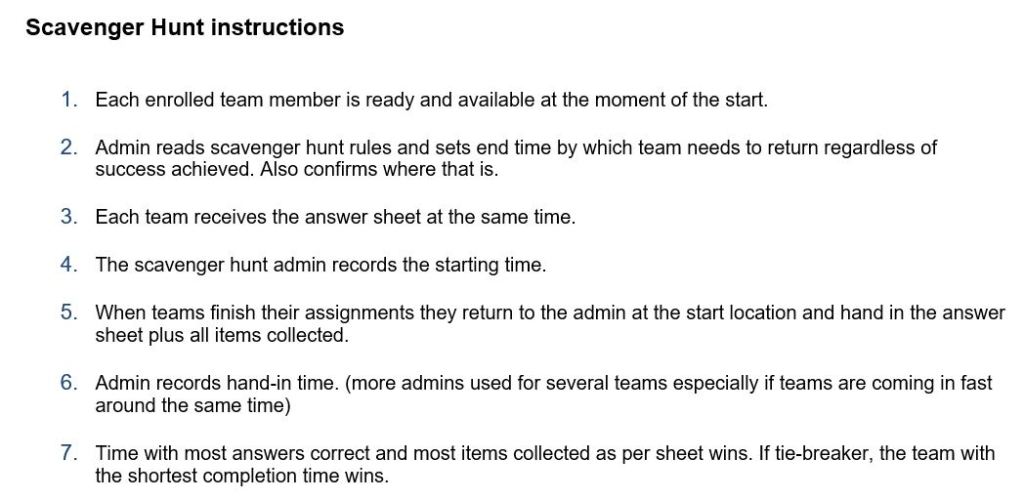
To maximize engagement and fun, tailor the hunt to your team’s size and time constraints. Smaller teams (3-4 people) might require more time to complete challenges than larger groups (5-6 people). Consider dividing larger teams into sub-groups to foster collaboration and friendly competition. The template shown before took around 2 – 2.5 hours for 10 teams of 4 people to complete.

Design a worksheet that includes a mix of questions, physical challenges, and creative tasks. Setting a time limit adds excitement and encourages teamwork. The team that successfully completes the most challenges within the allotted timeframe emerges victorious.

Remember, the goal is to create a fun and engaging experience that brings your team closer together.

When the group is ready, you would first share the instructions with them. Be sure to include areas that they are not to visit or boundaries for the exercise. Include the maximum time they should take to work on the assignment and where everyone should meet at the end of that period – whether they were able to complete the task or not.

Continue reading “Boost Teamwork with an Indoor Scavenger Hunt”

From Skills Gap to Training Plan: A Strategic Approach


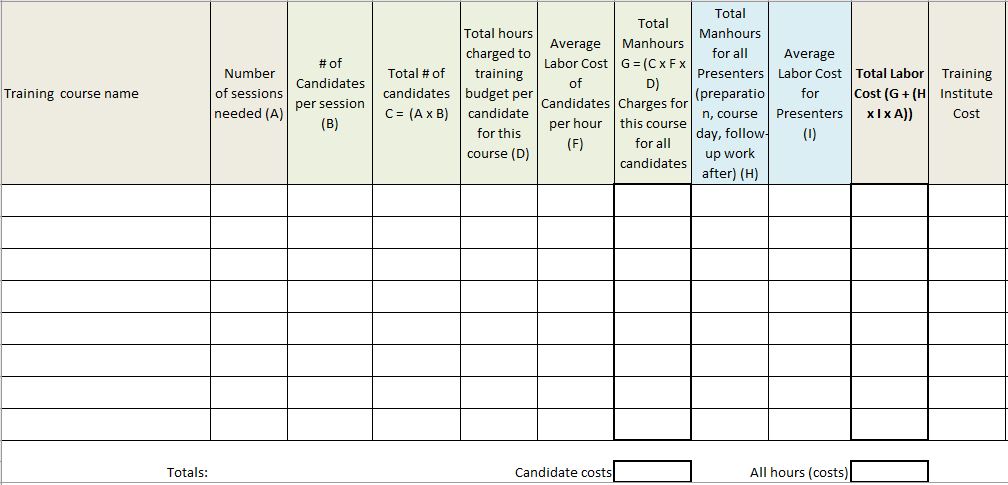
Training departments are usually expected to provide an annual plan showing training classes and learning interventions which will be offered over the course of the year. Managers want to see when they can plan to send employees to attend specific training courses and they also would like to see that the training plan addresses key areas where performance improvement may be needed for their departments or business units. Lastly, there is also usually the need to create a budget for the planned training. All of these focus areas are covered in the templates that can be downloaded below.

What kind of training should you provide?

Consider the following sources of information which could help:

  • Company strategies for growth and developing into new markets or expanding in existing markets – what skills would be needed?
  • Based on current performance – which skills need to be introduced and which skills should be improved upon?
  • Looking at employee career goals, which skills do you need to focus on in order to help move employees to being promotion-ready?
  • Which skills do managers believe would help their teams succeed better given performance targets and customer demands?

Summary of the kinds of Training Needs to Identify

Tools and Templates

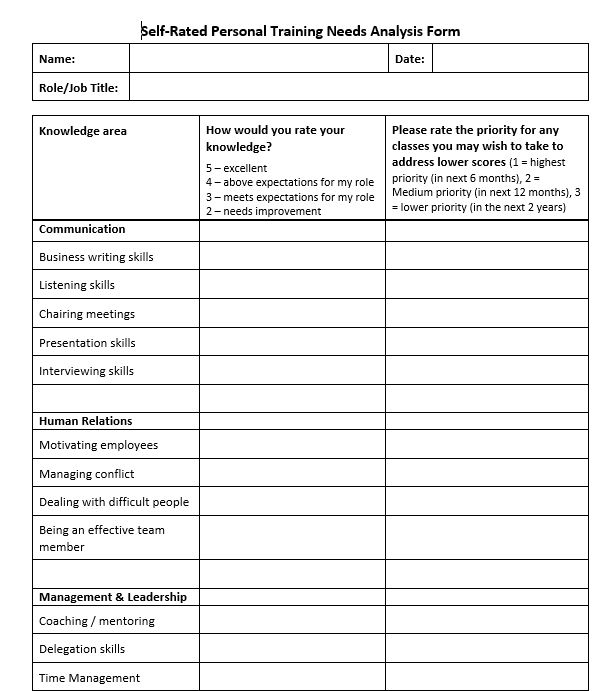
Here are three tools that can help you with conducting a training needs analysis. The first tool highlights individual training needs per employee and is based on employee self assessments. The second tool is a training needs view from a manager’s perspective focusing on the top 3 highest training needs for each employee in his/her group/team/department. The last tool helps you budget for the planned training.

  • Self-rated individual training needs. The quality of the results you obtain from this tool depends on whether you have a good career development tool/framework in place, motivated employees who maintain and work on their own development plans on an on-going basis and whether your managers/supervisors provide quality performance feedback to employees on a regular basis.
  • Manager assessment of department/team. Using knowledge of employee performance in his/her department, the manager selects the top 3 courses that each employee would need to improve own performance and/or to grow further in his/her career. Be sure to share course details with the managers too – what is the duration of the course and what aspects of the topic is covered?
  • Training needs and budgeting. This spreadsheet helps you budget for the planned courses. Check actual spending against this estimate to track the accuracy of your original budget and accurate allocation of items charged to your training budget.

Tips for training needs analysis:

  • Create a training needs analysis process that you follow consistently every year. This helps managers get into a rhythm of providing you with the required information on time for you to submit budget requests for the following year/quarter.
  • Be clear with managers which part of the training costs would be booked to their own budgets. For example – where do employees charge their time when they are in a training class? To your budget or to their manager’s budget?
  • Ask yourself how much training does it make sense to provide internally vs using an external vendor. Make wise trade-offs in terms of training costs, best value for money, expertise needed to provide the training etc.
  • Determining the training plan for the following year should also include a good review of the training evaluations and feedback obtained from course participants during the lasts year. Are your current training classes good enough or do they need to be improved or outsourced?

Training Certificate Example


When employees complete internal courses, one can be stuck with having to create a professional-looking training certificate for training participants. Not everyone has a knack for that, so here is a basic basic template (you can download it below) which can give you a good starting point for making your own training certificates. It is in *.ppt (Microsoft PowerPoint) format so you can edit the details as needed.

Receiving a training certificate is good way to recognize employees for completing required training courses and handing them out during a townhall meeting or other company event can help reinforce how much the company values the completions.

Using technology currently available to us it is more possible to avoid printing paper versions of a certificate. You can create the certificate electronically and also add digital signatures then save it as a *.pdf document or a picture. That way distribution can take place by means of sharing a hyperlink to the certificate or attaching an electronic file to an email addressed to the recipients.

Some tips:

  • When you customize the file or change elements, beware of creating something that is overly colorful and “busy” with competing elements – graphic and text.
  • When you insert digital signatures be very careful about who has access to those. It is a very sensitive graphic to have and can easily be abused if it falls into the wrong hands.

Training Evaluation Forms


Beyond the Basics: The Importance of Effective Training Evaluation

It’s easy to get caught up in the logistics of training – did people show up, did they enjoy the food, was the room comfortable? While these factors are important, they don’t tell us if the training actually worked. To truly measure the effectiveness of a training program, we need to dig deeper.

Focusing solely on surface-level feedback, like how attendees felt about the event or the trainer, is like judging a book by its cover. It might look good on the outside, but what really matters is what’s inside – the knowledge gained, the skills developed, and the behavior changes that occur.

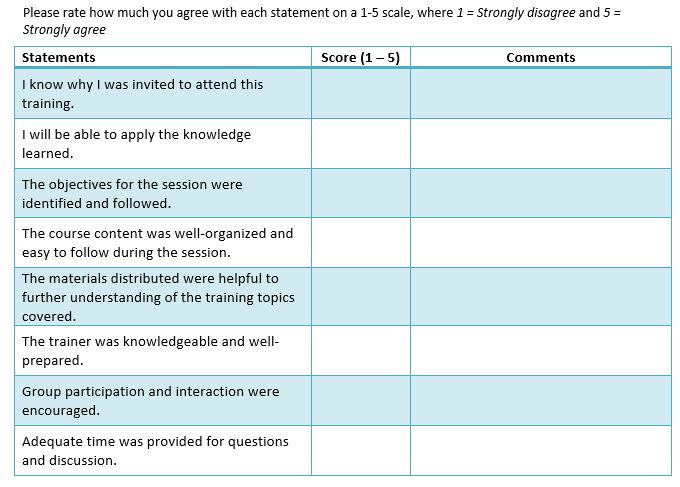
To delve deeper you may want to consider questions like:

Continue reading “Training Evaluation Forms”